Meet the Trance Tracker
A tiny app for the moment of noticing. One tap when a trance begins, one tap when you come back — your own data starts showing you the way home, and a small circle notices right alongside you.
"One tap at the moment of noticing. The noticing is the data."
Free · Works on any phone · Nothing to hunt for in an app store
Put it on your home screen
The Trance Tracker is made for your phone — there's just no app store to visit. Open one link on your phone, pin it to your home screen — about thirty seconds, and it's yours.
- Open the Trance Tracker in Safari. Tap the button below — Safari is the one browser that can pin apps to your home screen on iPhone.
- Tap the Share button — the little square with the arrow pointing up, at the bottom of the screen.
- Scroll down and choose "Add to Home Screen," then tap Add.
- From now on, open it from its icon. It runs full-screen, like any app.
On a computer? Point your phone's camera here — the Tracker opens right on your phone.
- Open the Trance Tracker in Chrome. Tap the button below.
- Tap the ⋮ menu in the top-right corner of Chrome.
- Choose "Add to Home screen" — on some phones it says "Install app" — and confirm.
- From now on, open it from its icon. It runs full-screen, like any app.
On a computer? Point your phone's camera here — the Tracker opens right on your phone.
- The Tracker really lives on your phone — the moment of noticing usually happens away from your desk. Point your phone's camera at the QR code and the Tracker opens right there. (Or just open this page on your phone — it will walk you through the install.)
- Want it on this computer too? Open the Trance Tracker in Chrome or Edge with the button below, then click the small install icon at the right end of the address bar — or simply bookmark it.
Point your phone's camera here — the Tracker opens on your phone, ready to pin.
Not a food diary. A noticing practice.
The Trance Tracker lives on your home screen like any other app, but it doesn't count anything about what you eat. It tracks just two moments — when a trance begins, and when you return. Because in this work, the return is what matters.
Catch the moment
When you notice a trance starting, one tap logs it — which pattern, when, and a one-phrase note about what was happening. That's the whole job.
Mark the return
When you come back, tap again, and the app quietly works out your recovery time.
"The app never grades a day. It only measures how fast you came back."
See your pattern emerge
Tag each moment and watch your primary pattern show up in your own data — not a quiz result. Your actual life.
Share it with your circle
Any moment you log can be shared into The Circle — a small room of others doing this same noticing, and the room stays together. They see the trance and its promise, never the behavior. First name or a nickname, your choice.
"You don't have to walk this path alone."
Read your week
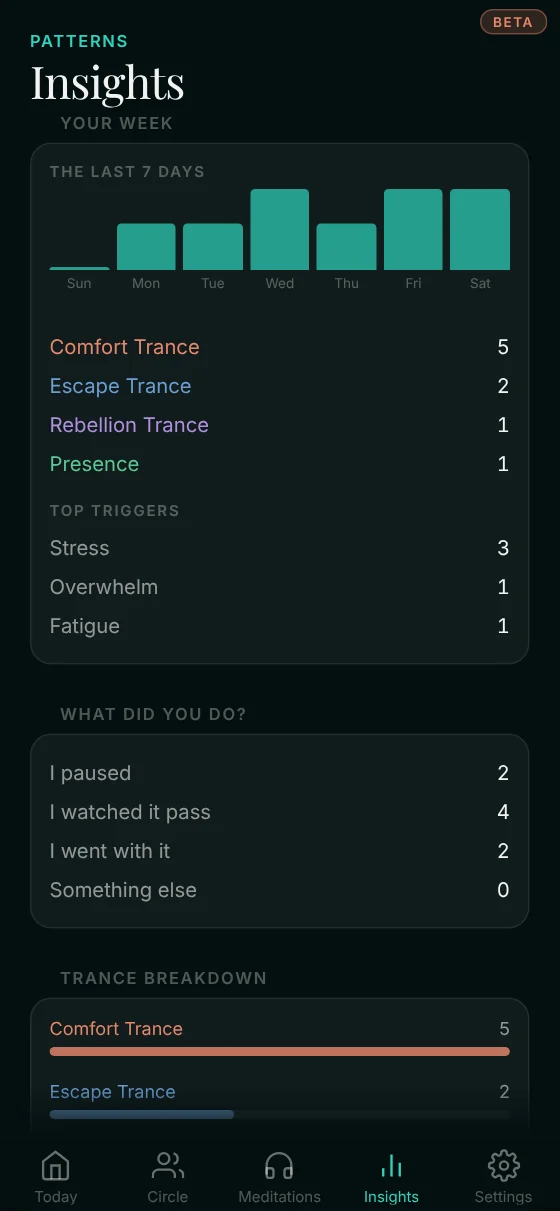
A weekly view shows how often each trance visited, how your recovery time is trending, and the hours of the day when your Parts work hardest.
Then something shifts.
Each cluster on your chart is a Part working hard at a particular hour of your life. The chart stops being a record of behavior and becomes a map of who, inside, needs to be met.
You don't have to notice alone
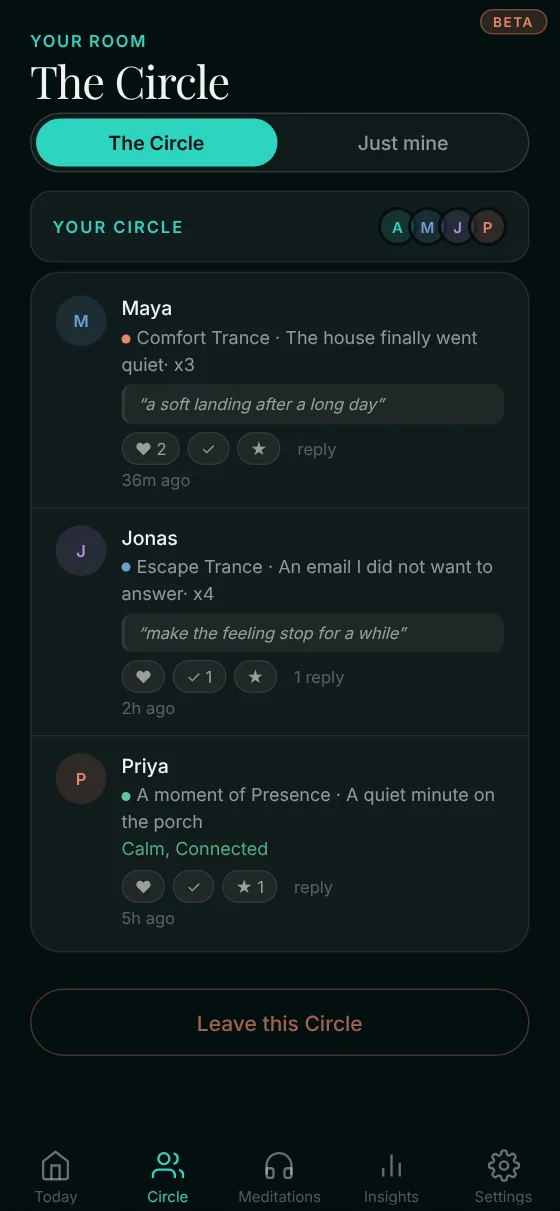
The Tracker gathers small circles of up to ten people, mixed patterns, and each room stays together. Log a moment and your room opens on its own; there's nothing to join and no one to invite. What you choose to share lands there — the trance, what set it off, what it was promising — and the others can answer with a heart, a "same," a few quiet words. This path was never meant to be walked alone.
A quick walk-through
These are real screens from the beta — exactly what you'll see. One log takes about fifteen seconds.
1
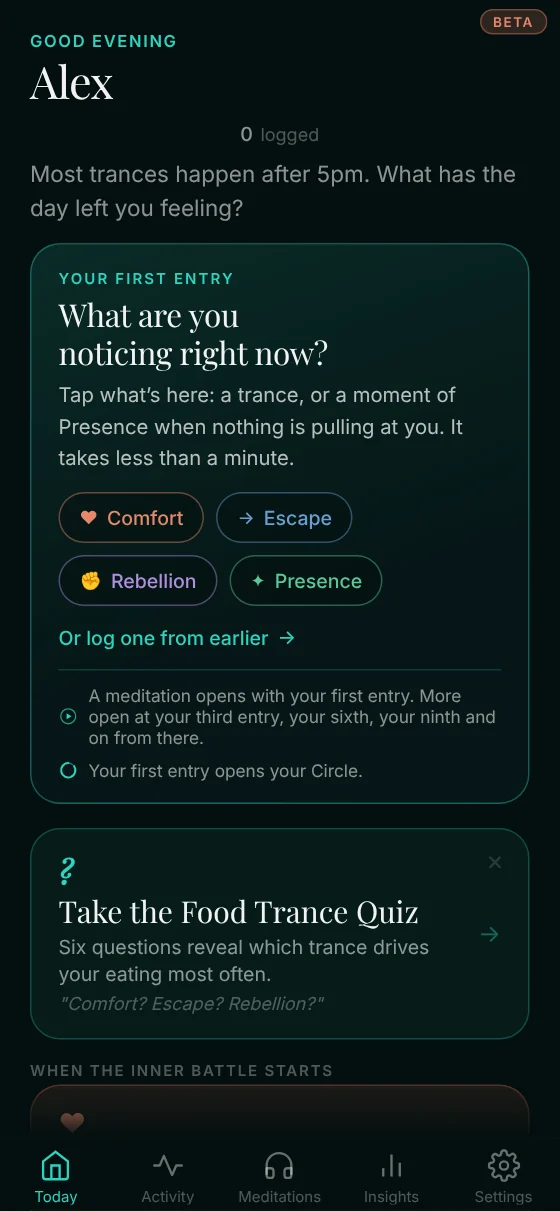
Your day, at a glance
The Today screen greets you by name and holds all three patterns — plus A moment of Presence, for when nothing is pulling at you. When something starts, tap its card.
 2
2
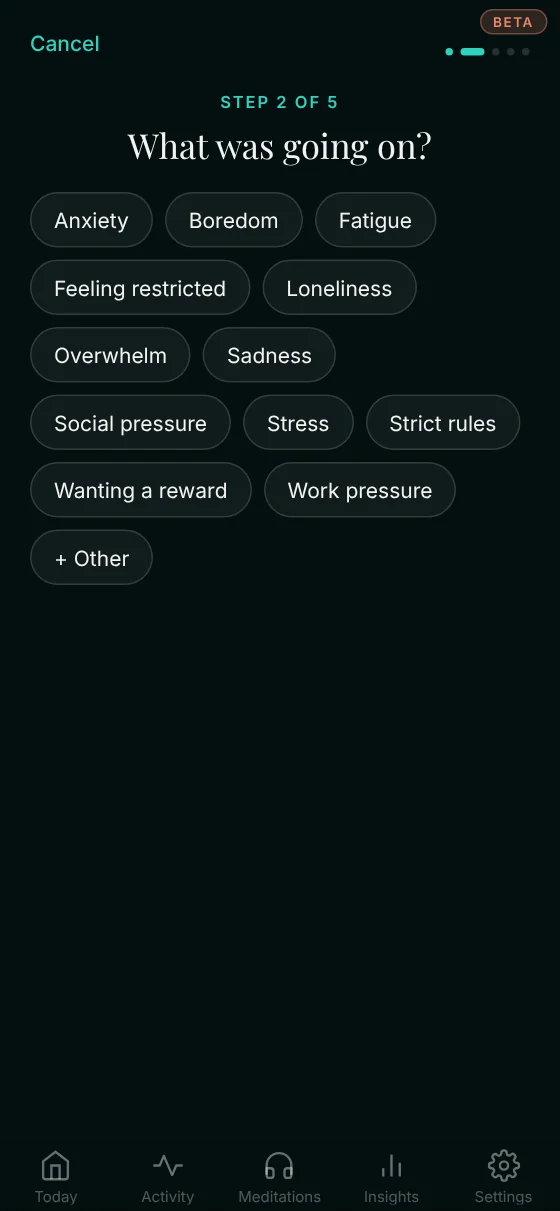
Name what triggered it
One tap: stress, boredom, loneliness, feeling restricted… or add your own. No typing required at the hard moment.
 3
3
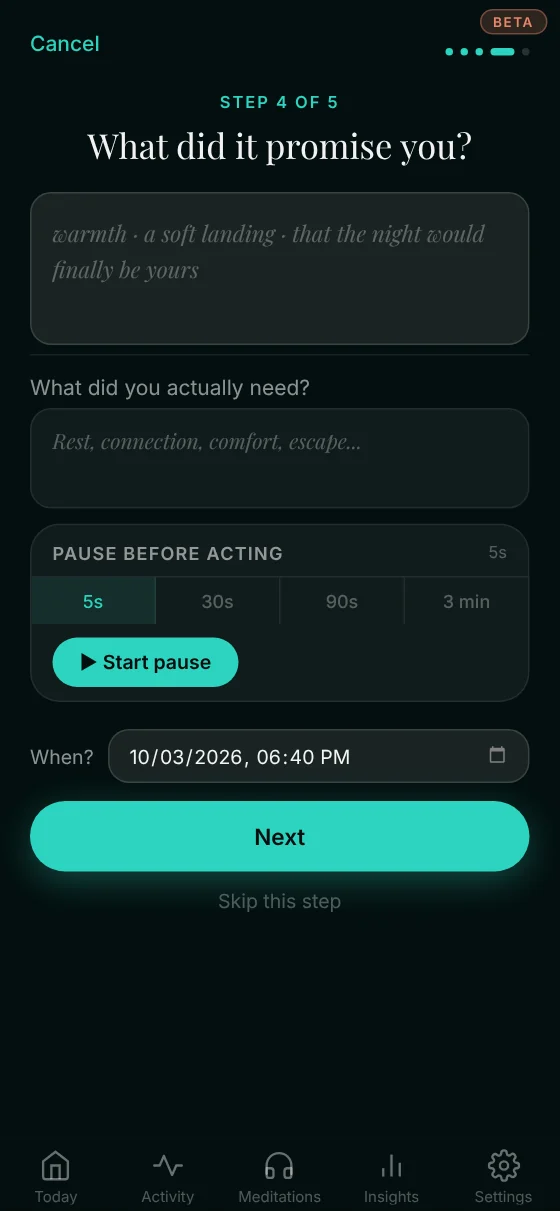
Pause before acting
The quietest feature: an optional 5-second to 3-minute pause, while the app asks what the food was promising — and what you were really needing.
 4
4
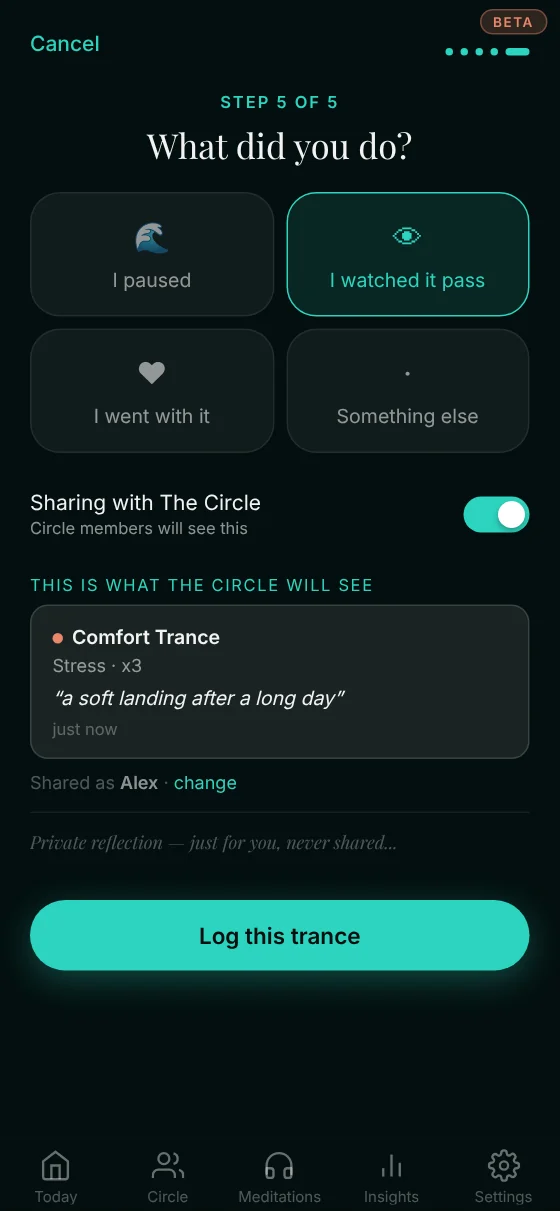
Say what you did
I paused, I watched it pass, I went with it, or something else. Every answer is a log, never a grade.
 5
5
Watch it gather
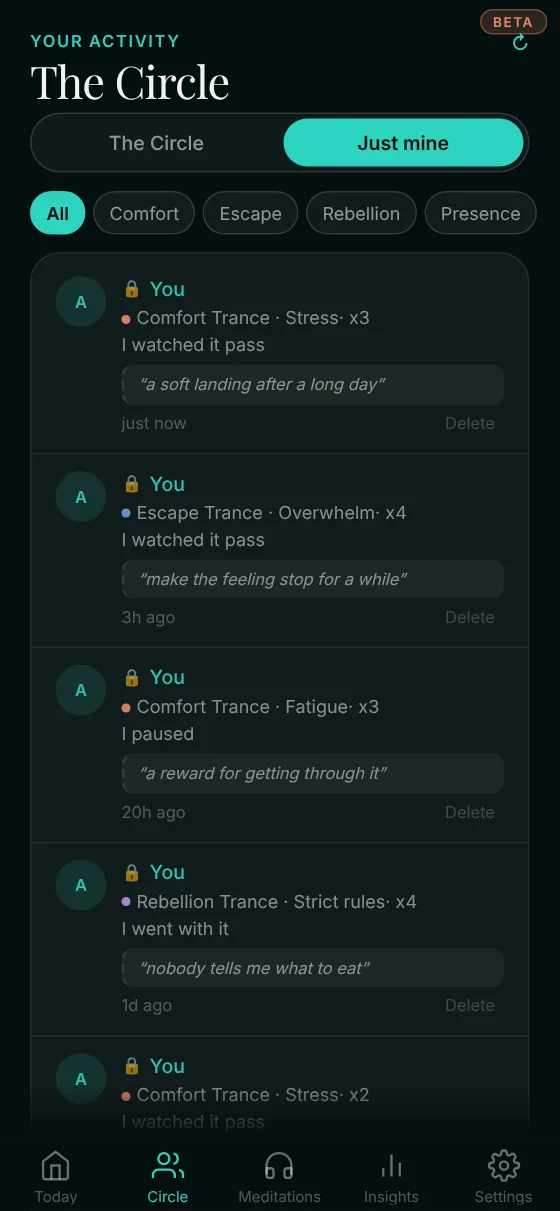
Every noticing is kept under Just mine — which trance, what was going on, what you did.
 6
6
Meet your Circle
Shared moments land in a small room of others noticing too. First names or a nickname only. A heart, a "same," a few words back.
 7
7
Read your Insights
Your week, what you did, your pattern breakdown, your top triggers — the picture emerges from your own life, not a quiz.
 8
8
Meditations that open as you go
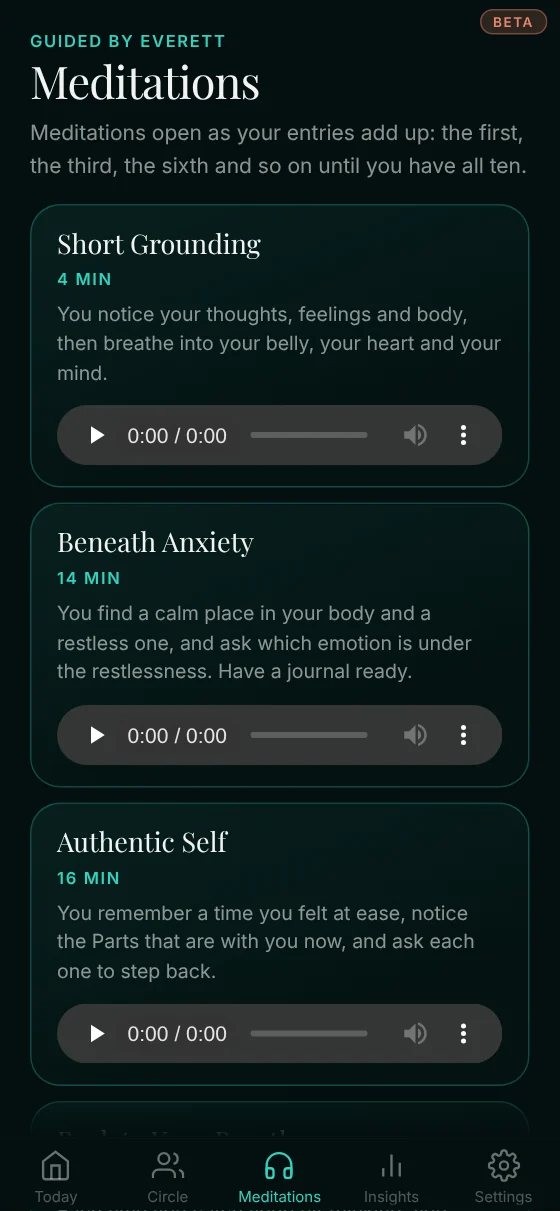
Meditations open as your entries add up: the first, the third, the sixth and so on until you have all ten.
Screens shown are from the beta and may shift a little as the app grows.
A note while we're in beta
You're getting the Tracker early, while it's still being polished. Everything above works today — but a few edges may move around as it grows, and you might spot the occasional quirk.
If you do, I'd love to hear about it. Just reply to any of my emails and tell me what you noticed. You're helping shape this.
— Everett